Installing cloud native tools in windows 10 using chocolatey package manager
Installing cloud native tools for SUSE Udacity course in windows using chocolatey package manager
I am taking a Udaciy course for cloud native fundamentals and in the first lesson you need to install the following tools before continuing
- Python
- Git
- Docker
- Vagrant
- VirtualBox
I am using Windows 10 machine and there is a package manager called chocolatey (similar to apt and dnf in some linux distros) which I have been using for a while now.
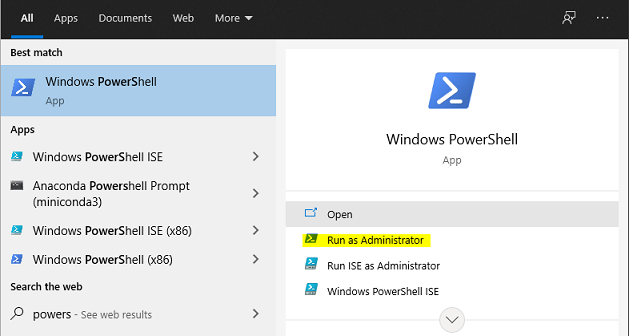
To use it you need to run powershell as administrator (press WIN+S keys and search for powershell then run as administrator)
If this is the first time using chocolatey you need to install it first
Copy the following code (from chocolatey website)
Set-ExecutionPolicy Bypass -Scope Process -Force; [System.Net.ServicePointManager]::SecurityProtocol = [System.Net.ServicePointManager]::SecurityProtocol -bor 3072; iex ((New-Object System.Net.WebClient).DownloadString('https://chocolatey.org/install.ps1'))
And past it into the PowerShell terminal then hit Enter
Note: the main command to run is
iex ((New-Object System.Net.WebClient).DownloadString('https://chocolatey.org/install.ps1'))
which will Invoke-Expression in the install.ps1 file after downloading it. the rest of the command is set the security policy for powershell to allow the downloaded powershell script to be executed.
After installing chocolatey, you can install all the requirements with this command
choco install python git docker-desktop vagrant virtualbox
You can also use choco upgrade PKG-NAME to upgrade a package.
You might also need to change the default WSL version to version 2 by issuing this command
wsl --set-default-version 2
Another important thing, you need to check that virtualization is enabled from the BIOS/UEFI settings (this will depend on your computer model, you can search in your preferred search engine how to do this)
I use conda to manage my python environments, so I did not install python using chocolatey. I just started by installing the tools if I face something in the upcoming lessons I will update this post